Using Google Search Console the right way can boost organic traffic by up to 28%.
And yet most marketers only open it when rankings drop. That instinct is exactly why their growth stalls.
This Google Search Console guide is written for SEOs who want GSC to drive decisions, not sit inside monthly reports.
In this blog, you will know how to spot quick-win keywords, diagnose traffic drops, fix CTR gaps, and read Search Console for SEO the way working practitioners read it.
What Google Search Console Actually Is (And What It Does Not Tell You)
Google Search Console is the only platform that gives you direct data from Google itself. Every other SEO tool estimates. GSC measures, which is why a real Google Search Console guide should always start here.
What Google Search Console Tracks
The platform tracks search clicks, impressions, CTR, average position, indexing status, and core technical signals like Core Web Vitals and crawl errors. Each of these maps to a real decision a working SEO has to make every week. So you stop guessing and start operating from primary data.
Why GSC Still Matters in 2026
AI Overviews, generative SERPs, and AEO surfaces have changed how clicks happen, but GSC is still the source of truth for what Google rewards. It now reflects impressions from AI-influenced SERPs, which makes it useful for both classic SEO and AI search visibility work. That is why our team pulls GSC data into every audit before touching any third-party tool.
What GSC Cannot Tell You
GSC will not show you competitor rankings, true keyword volume, conversion quality, or full user behavior. And it cannot reliably confirm whether your page is being cited inside an AI Overview. So treat it as a search intelligence layer, not a complete analytics stack.
The Biggest Misconception About GSC
Most teams treat GSC like a strategy tool. It is not. It is a diagnostic and intelligence platform that tells you what is working and what is breaking, then leaves the strategy to you.
The 3 Google Search Console Reports That Matter Most
Three reports inside GSC do most of the heavy lifting. Any practical Google Search Console guide should center on these, because the rest are useful but rarely change a decision.
1. Performance Report: Where SEO Growth Actually Happens
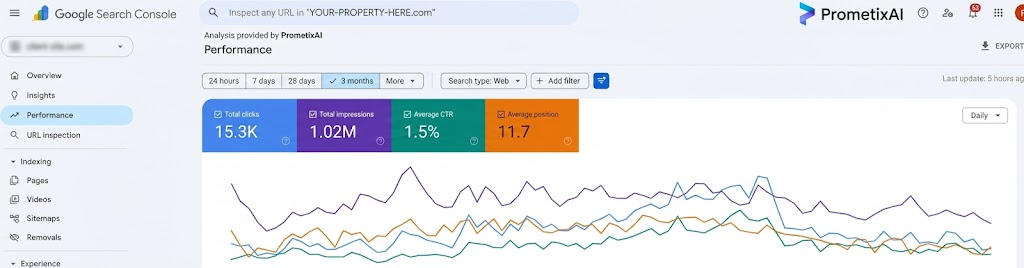
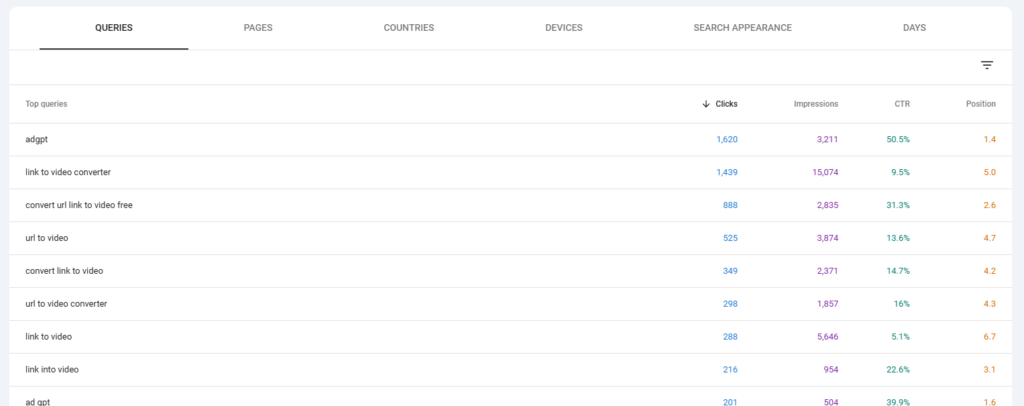
The Performance report shows queries, pages, devices, countries, search appearance, and date comparisons in one view. This is where the trend stories live. You can see which queries are gaining impressions before clicks ever start to move.
Impressions matter more than people give them credit for. They are the leading indicator. When a page suddenly starts gaining impressions on a high-intent commercial query, that is Google testing your relevance, and you have a window to push it before competitors notice.
The metrics that drive real action are clicks, CTR, average position, and query trend over time. Read query intent right inside this report. Words like “how” and “what” signal informational intent, while “best,” “vs,” and “near me” signal commercial intent.
2. Indexing Report: Why Some Pages Never Rank
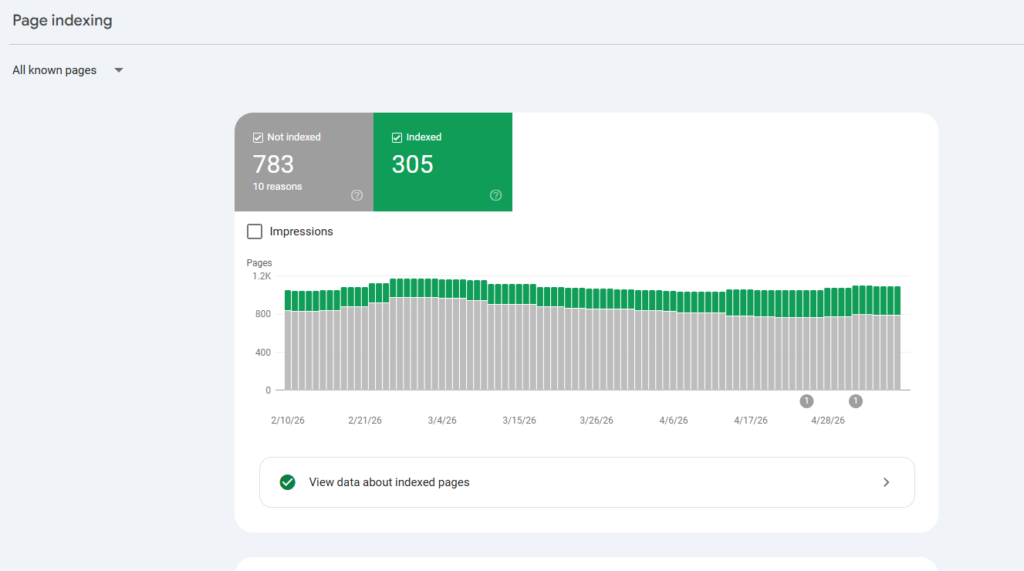
The Indexing report (formerly the coverage report) tells you which pages Google has actually accepted into its index. The four buckets that matter most are indexed, crawled but not indexed, discovered but not indexed, and duplicate without user-selected canonical.
Common errors include canonical conflicts, thin content, duplicate URLs from faceted navigation, soft 404s, and broken sitemap entries. Indexing problems hurt SEO more than ranking drops, because a page that is not indexed cannot rank at all. We have seen ecommerce clients recover meaningful traffic just by fixing canonical tags surfaced inside this report.
3. Core Web Vitals: The UX Signal Most Sites Ignore
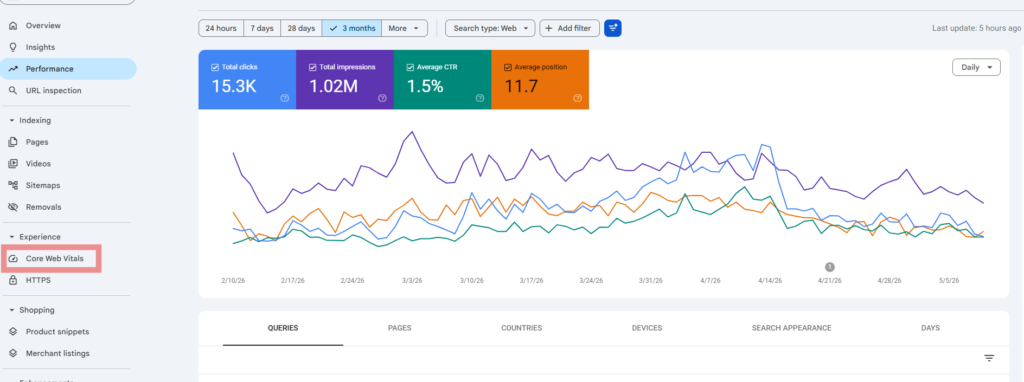
Core Web Vitals measure LCP, INP, and CLS, which together describe how fast and stable a page feels. They are an indirect ranking signal, but they correlate strongly with engagement, especially on mobile. Heavy scripts, unoptimized images, slow hosting, and layout shifts are the usual culprits.
Start with mobile, focus on your highest-traffic URLs, and validate every fix inside GSC. That is where Google records the actual improvement.
How to Find Quick-Win Keywords Hidden Inside GSC
The fastest organic wins are usually keywords your site already ranks for, just not high enough to get clicks. This is the unglamorous part of how to use Google Search Console that produces compounding traffic gains.
The Easiest SEO Wins Already Rank
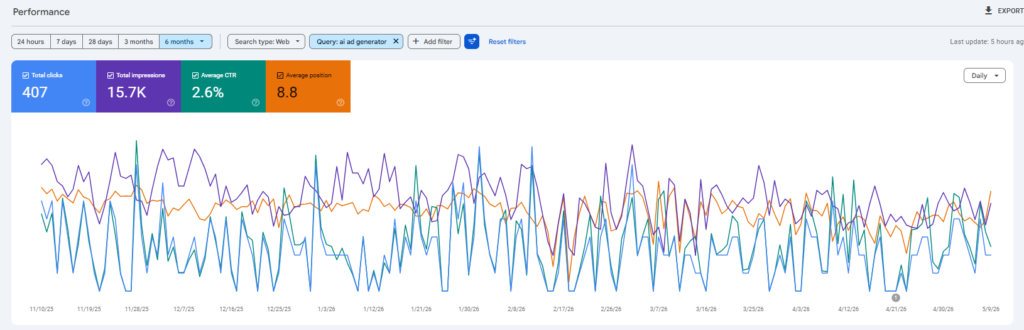
Look for keywords sitting between positions 5 and 15. Google already trusts your page enough to rank it on page one or two, so moving from position 8 to position 4 is far easier than ranking a brand new page from scratch.
The Best Query Filters to Use
Inside the Performance report, apply these filters to surface real opportunities:
-
- High impressions paired with low CTR
-
- Position greater than 5 and less than 15
-
- Pages with strong topical authority but underperforming queries
These filters cut through noise and surface the keywords actually worth working on this week.
How to Turn Impressions Into Clicks
Rewrite the title to match the exact intent of the query. Improve the meta description with a specific benefit. Add an FAQ block to capture related long-tail queries. And expand topical depth where the article skims a subtopic competitors cover thoroughly.
How to Identify Underperforming Pages
A page with strong impressions but weak clicks is telling you something is broken at the SERP level, usually a weak title or intent mismatch. High position volatility on the same query is another red flag. So is engagement that drops fast even with steady traffic.
How to Diagnose a Traffic Drop Using Date Comparison
When traffic drops, the first move is not panic. It is the date comparison filter inside GSC. This is the single most useful workflow most teams skip, and it deserves a place in any honest Google Search Console guide.
Start With Date Comparison
Compare the last 28 days against the previous 28 days. If the topic is seasonal, compare year over year instead. So you separate real decline from normal pattern noise.
Check Whether the Drop Is Query-Level or Sitewide
Filter by page first to see if a single URL caused the drop, then by query to see if a specific keyword cluster lost ground. A sitewide decline points to a Google update, a manual action, or a technical issue. A page-level decline usually points to content decay or a SERP change.
Analyze Impressions vs Clicks
Stable impressions with falling clicks usually means CTR collapsed, often because an AI Overview ate the click. Falling impressions point to ranking loss. The shape of the gap tells you the cause.
Check for Technical Problems
Cross-reference with the Indexing report, manual actions tab, Core Web Vitals report, and crawl stats. We have caught major traffic drops tied to a single misconfigured robots.txt rule using exactly this workflow.
Investigate SERP Changes
Sometimes the drop is not yours at all. AI Overviews, new featured snippets, refreshed competitor pages, and intent shifts can all change the SERP under you while your ranking technically holds steady.
CTR vs Average Position: What the Gap Actually Tells You
The gap between your CTR and your average position is one of the most useful diagnostic signals inside GSC. It tells you whether the SERP is working for you or against you.
Why Rankings Alone Are Misleading
Position one used to mean clicks. Today, AI Overviews, People Also Ask boxes, and shopping carousels all eat into organic CTR before your link is even seen. So a stable ranking with declining CTR is not a content problem. It is a SERP problem.
What Causes Low CTR Despite Good Rankings
Weak titles, vague meta descriptions, intent mismatch, and aggressive SERP competitors are the common causes. Sometimes the page ranks for a query the content does not actually answer. That mismatch shows up as impressions without clicks.
Expected CTR Benchmarks by Position
Use these rough benchmarks to compare your pages against typical performance:
| Position | Expected CTR |
| 1 | 20–35% |
| 2–3 | 10–20% |
| 4–6 | 5–10% |
If your page sits at position 3 with a 4 percent CTR, the SERP is taking your clicks. So fix the snippet, not the ranking.
How to Improve Organic CTR
Rewrite titles with specificity, use emotional triggers without sounding clickbait, add a clear date or version cue when relevant, and align the title to the dominant intent of the query.
How to Use Google Search Console Alongside GA4
GSC and GA4 answer different questions, and the SEOs who get the most out of both stop forcing them to overlap. This is one of the most underrated GSC tips for serious teams.
What GSC Does Better Than GA4
Search queries, ranking visibility, indexation monitoring, and search impressions all live in GSC. GA4 simply does not track these. So if you want to know how Google sees your site, that is GSC territory.
What GA4 Does Better Than GSC
Engagement tracking, user behavior flows, conversion analysis, and revenue attribution belong to GA4. It tells you what users do once they land. GSC tells you how they got there.
The Best Way to Combine Both Platforms
Pull acquisition data from GSC, then map landing pages to GA4 conversion events. Pages with high impressions but low conversions are content quality problems. Pages with low impressions but high conversions are scaling opportunities.
SEO Decisions You Can Make Faster With Both
Together they answer which pages deserve updates, which queries actually drive revenue, and which traffic is low quality. That is the layer where SEO turns into real business growth.
What Most SEO Teams Still Get Wrong About GSC
Even experienced teams misuse Google Search Console in predictable ways. These habits look productive but quietly cap your growth ceiling, which is why this Google Search Console guide ends here.
Obsessing Over Rankings Instead of Trends
A single ranking position is a snapshot. A 90-day impression trend is a story. Trend analysis predicts where your traffic is going. Rankings only describe where it has been.
Ignoring Impressions
Impressions are the earliest signal of opportunity. So when impressions on a commercial query start climbing, that is the moment to optimize, not weeks later when clicks finally show up.
Never Segmenting Data
Aggregate data hides everything that matters. Use device filters, country filters, and search appearance filters to find pockets of underperformance. Mobile CTR can be collapsing while desktop looks fine.
Treating GSC as a Reporting Tool Only
GSC should drive weekly action, not monthly slide decks. If your only output from GSC is a screenshot in a client report, you are leaving most of its value untouched.
Forgetting Search Intent Changes
SERPs evolve. A query that was informational last year may now be commercial. So rankings can hold steady while CTR collapses, simply because intent shifted under your content.
Final Thoughts
The single most important takeaway from any Google Search Console guide is this. GSC rewards teams that act on it weekly, not those who review it monthly. Impressions, position movement, and CTR gaps are early signals. Acting on them is what turns GSC from a dashboard into a growth engine.
If you want to apply this Google Search Console guide to a real site, start with one filter: position 5 to 15, sorted by impressions. That single view will surface more quick wins than any keyword research tool you currently pay for.
So want help turning your GSC data into measurable AI search visibility and ranking gains? Book a strategy call with PrometixAI and we will map your top quick-win keywords from this Google Search Console guide into a 90-day execution plan.
Book Your Free Strategy Call →